
As a business owner, you understand that your customers are the lifeblood of your company. But as you grow, managing the web of interactions, leads, and data can quickly become overwhelming. You might find yourself asking, how to choose a CRM that fits your specific needs. It’s a critical question because the right system is not just a database—it’s the engine that drives your sales and customer satisfaction. For a small business, a new startup, or an established company, this decision is pivotal.
Choosing a CRM system is a strategic move that requires careful thought. This guide will walk you through a step-by-step process, helping you understand how to choose a CRM system that will empower your team and fuel your growth, with special considerations for small businesses and unique needs like direct mail integration.
Quick Comparison Table: Top CRM Systems at a Glance
| CRM Platform | Best For | Starting Price | Gartner Quadrant | Direct Mail Integration | Key Strengths |
|---|---|---|---|---|---|
| Salesforce | Enterprise & Growing Businesses | $25/user/month | Leader | ✅ Native (Lob) | Most customizable, extensive app ecosystem |
| HubSpot | Startups & SMBs | Free / $50/month | Leader | ✅ Via Zapier/Integrations | Best free tier, intuitive interface |
| Zoho CRM | Small Businesses & Startups | $14/user/month | Visionary | ✅ Native/Zapier | Affordable, feature-rich, AI-powered |
| Pipedrive | Sales-Focused Teams | $14.90/user/month | Niche Player | ✅ Via Zapier | Best sales pipeline visualization |
| Freshsales | Growing SMBs | Free / $18/month | Challenger | ✅ Via Zapier | Built-in phone & email, AI insights |
| Insightly | Project-Based Businesses | $29/user/month | Niche Player | ✅ Via Zapier | Strong project management features |
| Monday.com | Visual Workflow Teams | $12/user/month | Niche Player | ✅ Via Integrations | Highly visual, no-code automation |
The 5-Step Roadmap: How to Choose a CRM
Navigating the crowded CRM market can feel daunting, but by breaking the process down into manageable steps, you can make a confident decision that aligns with your business goals.
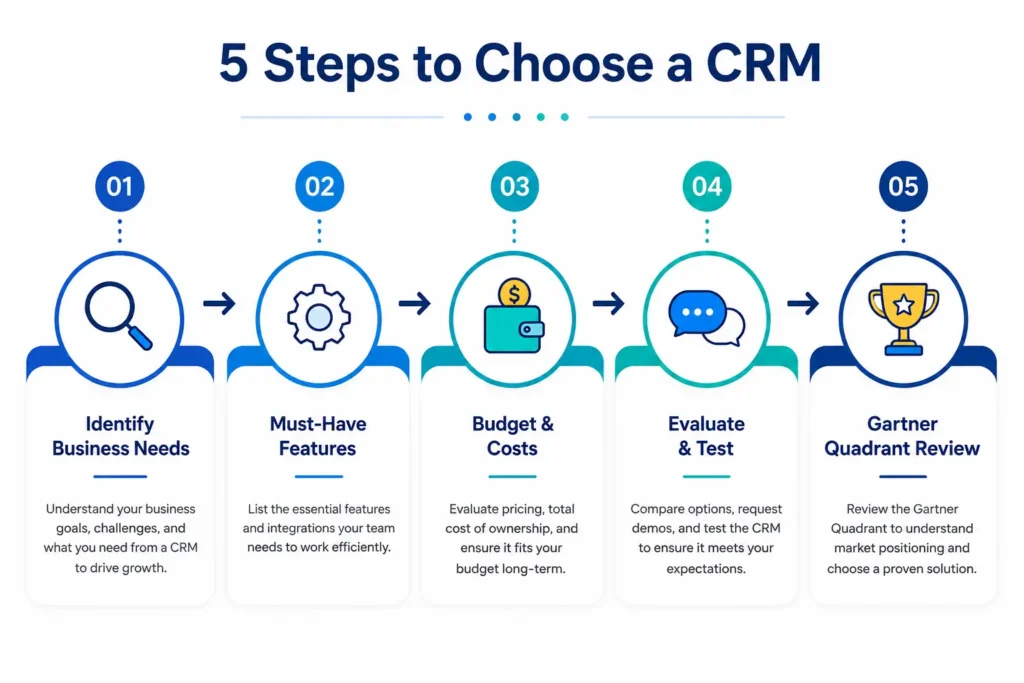
Step 1: Identify Your Business Needs
Before you even start looking at software, you need to look inward. This first step is the most crucial in knowing how to choose a CRM for your small business or startup. Start by identifying your business goals. Are you looking to improve customer retention, increase sales, or streamline your marketing efforts?
Next, analyze your current processes. What works well? Where are the bottlenecks? Your CRM should support your existing workflows, not force you to change them for the worse. For a startup, this means understanding that your needs will evolve. In the early stages, you might just need a simple, low-cost contact database to get started. The goal is to prevent customer information from slipping through the cracks as you grow.
Step 2: Determine Your Must-Have Features
A CRM is only as good as its ability to perform the tasks you need it to do. While it’s easy to get distracted by a long feature list, focus on the essentials that will make a daily difference for your team.
- Contact and Lead Management: At its core, a CRM must centralize all customer and prospect information in one place. This includes contact details, interaction history, and communication preferences. This is the foundation for everything else.
- Sales Pipeline Management: You need a visual representation of your sales process to track deals, identify bottlenecks, and forecast revenue.
- Customization: Your business is unique. The CRM should be able to adapt to your specific processes with custom fields and personalized dashboards. However, avoid systems that are so complex they require a developer to set up.
- Reporting and Analytics: A CRM is a data-rich environment. You need the ability to generate reports to understand key metrics like conversion rates, sales cycle length, and pipeline health.
For a startup, a simple CRM with out-of-the-box functionality that is easy to use is often a better choice than a powerful but complex system that your team will struggle to adopt. For small businesses, focusing on features that automate routine tasks and improve efficiency can be a game-changer.
Step 3: Understand Your Budget and Total Cost of Ownership
Understanding the true cost is vital for any business, especially when considering how to choose a CRM for a new startup. Don’t just look at the monthly subscription fee.
- Pricing Models: CRMs use various pricing structures, including per-user subscriptions, tiered feature plans, and free versions. You need to understand how the cost scales as you add users and need more advanced features.
- Hidden Costs: Be aware of potential implementation and setup fees, data migration costs, and costs for ongoing support or customization.
- Return on Investment: While cost is a factor, don’t make your decision solely based on it. A more expensive system that dramatically increases sales and team productivity can offer a much better return on investment than a cheaper, but less effective, option.
Step 4: Evaluate Software Options and Seek User Feedback
Once you’ve defined your needs and budget, you can start comparing options. This is where the work pays off.
- Read Reviews: Consult trusted review sites and industry recommendations to learn from the real-world experiences of other businesses.
- Demos and Free Trials: Take advantage of product demonstrations and free trials. This is your chance to get hands-on experience to assess if the system is user-friendly and a good fit.
- Gather Feedback: Involve your team in the evaluation. They will be the ones using it daily, and their feedback on usability is invaluable. A feature-rich system is useless if nobody wants to use it.
Step 5: Leverage Industry Analyst Reports (e.g., Gartner)
For a more data-driven and high-level perspective on how to choose a CRM based on Gartner’s quadrant? you can look to the research of firms like Gartner. Their “Magic Quadrant” is a well-respected report that categorizes vendors based on their “ability to execute” and “completeness of vision,” placing them into four quadrants: Niche Players, Visionaries, Challengers, and Leaders. For instance, Zoho CRM has been recognized in the “Visionaries” quadrant for its product strategy and customer experience. This is an excellent tool to help build a shortlist of reputable vendors and understand their strategic positioning.
Special Considerations for a Startup vs. a Small Business
While the steps above are universal, your specific context matters. Understanding how to choose a CRM for a new startup is different from how to choose one for an established small business.
The Startup CRM
For startups, the focus should be on finding a CRM that is easy to use and adopts naturally. Early-stage companies rarely have the luxury of a dedicated system administrator. You need a system that your team can start using immediately, without extensive configuration. Cost is also a major factor, so look for affordable entry-level plans or free tiers.
The goal is to create a single source of truth for customer interactions from the beginning. As one expert notes, you should “choose a system for your current stage, not your imagined future,” because most startups will go through multiple CRM systems as they scale.
The Small Business CRM
For a small business, you’re likely looking to establish more structured processes. You need a system that provides clarity and helps you manage growth. This is where features like sales automation, robust reporting, and a clear sales pipeline become more critical. The challenge is often getting your team to adopt a new system that they might see as extra work. To solve this, focus on the benefits it brings, like spending less time on data entry and more time on closing deals.
Integration: Why It Matters
A modern CRM should not exist in a silo. It needs to integrate with your other business tools to be truly effective. This is a non-negotiable factor when determining how to choose a CRM.
Marketing and Sales Integration
Your CRM should connect with your email marketing and other sales tools. This allows you to track the entire customer journey from initial awareness to post-purchase support. For example, a sales rep can see a customer’s support history, and a service agent can see recent purchases, enabling more personalized and efficient service.
Read More: Check Our Services
How to Choose a CRM for Direct Mail Integration
For businesses that use direct mail as a marketing channel, understanding how to choose a CRM for direct mail integration is crucial. You need a CRM that can connect to a direct mail automation platform to send physical mail automatically.
It works like this: your CRM stores customer data (like names, addresses, and purchase history). You connect it to a direct mail platform like Lob, which uses that data to create, print, and send personalized postcards, letters, or self-mailers. Performance data then flows back to your CRM so you can measure the campaign’s success.
This automation eliminates manual tasks, helps you avoid costly errors by verifying addresses, and allows you to target the right people with precision. A platform like Salesforce integrates directly with Lob’s API to automate this entire process. If direct mail is a core part of your marketing strategy, ensure your chosen CRM has native integrations or robust API capabilities to support it.
Frequently Asked Questions (FAQs)
Q1: How do I choose the right CRM for my business?
Start by defining your specific business goals, identifying must-have features, setting a realistic budget, and evaluating multiple options through free trials. Involve your team in the decision-making process to ensure user adoption.
Q2: What is the best CRM for a small business?
The “best” depends on your needs, but popular options for small businesses include HubSpot (great free tier), Zoho CRM (affordable and feature-rich), and Pipedrive (excellent for sales teams). Consider your budget, team size, and required features when deciding.
Q3: How to choose a CRM based on Gartner’s quadrant?
Gartner’s Magic Quadrant evaluates vendors on “ability to execute” and “completeness of vision.” Use it to shortlist reputable vendors like Salesforce (Leader), Zoho (Visionary), and Freshsales (Challenger). However, don’t rely solely on the quadrant—combine it with hands-on testing and team feedback.
Q4: Can a CRM integrate with direct mail marketing?
Yes! Many CRMs like Salesforce and Zoho offer native integrations or API connections with direct mail platforms like Lob. This allows you to automate personalized physical mail campaigns directly from your CRM.
Q5: How much should a small business spend on a CRM?
Small businesses typically spend between $15–$50 per user per month. However, many CRMs offer free plans for up to 5 users. Consider your total cost of ownership, including setup, training, and integration costs.
Q6: How long does it take to implement a CRM?
Implementation timelines vary based on complexity. Simple CRMs can be set up in a few days, while enterprise-level systems may take several months. Startups and small businesses often benefit from choosing a solution that’s quick to deploy.
Q7: What are the biggest mistakes when choosing a CRM?
Common mistakes include choosing a system with too many features (overcomplicating), focusing solely on price, ignoring user adoption, failing to plan for data migration, and not testing the system thoroughly before committing.
Q8: How to choose a CRM for a new startup with limited budget?
Look for CRMs with generous free tiers like HubSpot or affordable entry-level plans like Zoho ($14/month). Prioritize ease of use and essential features over advanced capabilities. Choose a system that scales with you to avoid migrating later.
Q9: Is it better to choose an all-in-one CRM or best-of-breed?
All-in-one solutions are convenient and cost-effective for small businesses. Best-of-breed approaches (using specialized tools integrated together) are better for larger enterprises with complex needs. For most small businesses and startups, an all-in-one CRM is sufficient.
Q10: How do I ensure my team actually uses the CRM?
Involve your team in the selection process, provide comprehensive training, start with a phased rollout, and highlight the time-saving benefits. Choose an intuitive, user-friendly system to minimize resistance and maximize adoption.
Conclusion: Making the Right Choice
Choosing a CRM is one of the most important decisions you can make for your business’s growth. The system you select has the power to unify your teams, streamline your processes, and provide invaluable insights into your customers. The key is to be methodical: define your needs, set a budget, and thoroughly test the best contenders.